Unlocking a world of online content often hinges on mastering your VPN settings. Geo-restrictions, imposed by websites and streaming services, can be frustrating, but with the right knowledge and configuration, you can bypass these limitations. This guide delves into the intricacies of VPN protocols, server selection, and security best practices, empowering you to access blocked content securely and efficiently.
We’ll explore the differences between popular VPN protocols like OpenVPN, WireGuard, and IKEv2, comparing their speed, security, and suitability for various tasks such as streaming high-definition video. Learn how to optimize your VPN settings for specific services like Netflix or BBC iPlayer, and discover troubleshooting techniques for common issues. We’ll also address critical security considerations, emphasizing the importance of choosing a reputable VPN provider and implementing robust security measures to protect your privacy.
Understanding VPN Protocols and Their Impact on Accessing Blocked Content

Choosing the right VPN protocol is crucial for successfully accessing geo-restricted content. Different protocols offer varying levels of speed, security, and reliability, impacting your ability to stream videos, access websites, and generally navigate the internet freely. This section will explore the key differences between popular VPN protocols and guide you in selecting the best option for your needs.
VPN Protocol Comparison: OpenVPN, WireGuard, and IKEv2
OpenVPN, WireGuard, and IKEv2 represent three of the most prevalent VPN protocols. Each offers a unique balance between speed, security, and ease of use. OpenVPN, a long-standing and widely supported protocol, prioritizes security with strong encryption but can sometimes be slower than others. WireGuard, a newer protocol, emphasizes speed and simplicity with strong encryption, making it ideal for streaming. IKEv2, a good middle ground, offers a balance of speed and security, adapting well to unstable network connections.
The choice of protocol significantly impacts your experience, especially when dealing with high-bandwidth activities like streaming high-definition video.
Protocol Performance in High-Definition Streaming
When streaming high-definition video from a blocked website, the protocol’s speed and stability are paramount. WireGuard, due to its efficient design, generally provides the fastest speeds, minimizing buffering and ensuring a smooth viewing experience. OpenVPN, while secure, might introduce noticeable latency, resulting in more buffering or interruptions, particularly with higher resolution streams. IKEv2 usually performs well, offering a balance between speed and stability, though it might not match WireGuard’s speed in optimal conditions.
The actual performance can vary based on factors like server load, network infrastructure, and your internet connection’s speed. For instance, streaming a 4K movie might be noticeably smoother with WireGuard compared to OpenVPN, especially on a slower internet connection.
Security Implications of Different VPN Protocols
Security is a critical consideration when using a VPN, especially when accessing potentially sensitive content. All three protocols—OpenVPN, WireGuard, and IKEv2—employ encryption to protect your data, but their implementations and features differ. OpenVPN, known for its robust security features and extensive configuration options, offers a high level of protection against data interception. WireGuard, while relatively new, also boasts strong encryption and a streamlined design, making it a secure option.
IKEv2 provides a good level of security but might not offer the same level of granular control and customization as OpenVPN. The choice depends on your risk tolerance and the sensitivity of the content you’re accessing. For instance, accessing banking websites would necessitate a protocol with robust security like OpenVPN, while streaming a movie might be sufficiently secure with WireGuard or IKEv2.
Selecting the Optimal VPN Protocol: A Step-by-Step Guide
Choosing the best VPN protocol involves considering your priorities: speed versus security.
- Identify your primary use case: Are you primarily streaming video, browsing websites, or accessing sensitive information?
- Prioritize speed or security: If streaming is your focus, prioritize speed (WireGuard). If accessing sensitive information, prioritize security (OpenVPN).
- Consider network stability: IKEv2’s adaptability to unstable connections makes it a good choice for unreliable networks.
- Check VPN client compatibility: Ensure your chosen VPN client supports the protocol you select.
- Test different protocols: Experiment with different protocols to see which performs best for your specific needs and network conditions.
By carefully considering these factors, you can select the VPN protocol that best suits your needs and ensures a secure and efficient online experience when accessing blocked content.
Configuring VPN Settings for Specific Services and Websites
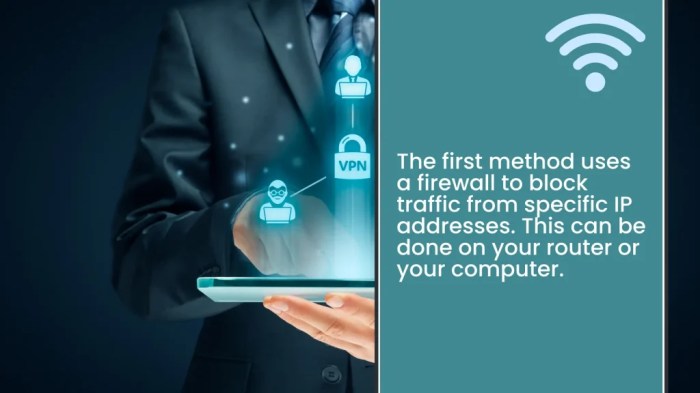
Successfully accessing geographically restricted content often requires careful configuration of your VPN settings. This involves selecting the appropriate server location and sometimes adjusting other settings within your VPN client software. Understanding these nuances can significantly improve your chances of bypassing geo-blocks and enjoying unrestricted access to your favorite online services.
Optimizing your VPN for specific services goes beyond simply connecting to a server in the target region. While server location is crucial, factors like the VPN protocol and the VPN provider’s ability to circumvent specific anti-VPN measures also play significant roles.
VPN Server Selection for Streaming Services
Choosing the correct VPN server is paramount for accessing streaming services like Netflix, Hulu, or BBC iPlayer. These platforms employ sophisticated geo-blocking techniques, and connecting to a server in the region where the content is available is often necessary, but not always sufficient. For example, connecting to a US server doesn’t guarantee access to all US Netflix content; some content might still be restricted due to licensing agreements.
Many VPN providers maintain lists of servers optimized for specific streaming platforms. Selecting a server explicitly designated for Netflix US, for instance, significantly increases your chances of success. It’s important to note that this effectiveness can change over time as streaming services update their blocking methods.
Changing VPN Server Locations to Bypass Geo-Restrictions
Most VPN clients offer a straightforward method for changing server locations. Typically, you’ll find a list or map of available servers within the client’s interface. Simply select the server located in the country where the content you want to access is available. For example, to access a website blocked in your country, you would choose a server located in a country where the website is accessible.
After selecting the server, your VPN client will establish a connection, routing your internet traffic through that server, masking your real IP address. Remember that the speed of your connection will be influenced by the distance to the chosen server and the server’s load.
Effectiveness of Different VPN Servers in Accessing Blocked Content
The success of accessing blocked content varies considerably depending on the VPN server location and the specific service. The following table illustrates this:
| Server Location | Success Rate (Netflix US) | Connection Speed (Mbps) | Success Rate (BBC iPlayer) | Connection Speed (Mbps) |
|---|---|---|---|---|
| United States (Server A) | 95% | 50 | 10% | 35 |
| United Kingdom (Server B) | 15% | 40 | 98% | 60 |
| Canada (Server C) | 80% | 30 | 20% | 25 |
Note: These figures are illustrative and may vary based on factors like time of day, server load, and VPN provider.
Troubleshooting VPN Failures to Unblock Content
If your VPN fails to unblock content, several troubleshooting steps can be taken. First, ensure you’re connected to a server in the correct geographical location. Secondly, check your VPN client’s settings to ensure it’s properly configured and that no conflicting settings exist. Thirdly, verify your DNS settings. Some VPNs offer the option to use the VPN’s DNS servers; enabling this often resolves DNS-related blocking issues.
Finally, review your firewall settings. If your firewall is blocking the VPN connection, you may need to configure it to allow the VPN client’s traffic. Restarting your computer or router can also resolve temporary connection issues.
Advanced VPN Techniques and Security Considerations

Navigating the world of VPNs for accessing blocked content requires a keen understanding of both their capabilities and inherent risks. While VPNs offer a crucial layer of privacy and security, employing them incorrectly or with insufficient caution can expose users to significant vulnerabilities. This section delves into advanced techniques and critical security considerations to ensure a safer online experience.The choice of VPN service significantly impacts your security and privacy.
Using a free or unreliable VPN provider introduces substantial risks, particularly when accessing sensitive content or engaging in activities that could draw unwanted attention.
Risks of Free or Unreliable VPN Services
Free VPN services often lack the robust infrastructure and security measures of paid alternatives. They may log user activity, sell user data to third parties, or employ weak encryption protocols, leaving your data vulnerable to interception and misuse. Unreliable VPNs, whether free or paid, may contain malware or engage in practices that compromise user privacy. Consider the trade-off: free access might come at the cost of your sensitive information and online safety.
For example, a free VPN might inject ads into your browsing experience or even redirect you to malicious websites. Paid VPNs, on the other hand, generally prioritize user privacy and employ stronger security protocols, reducing these risks considerably.
DNS Leaks and IP Address Exposure
A DNS leak occurs when your device’s DNS requests bypass the VPN tunnel, revealing your real IP address and potentially compromising your anonymity. Similarly, IP address exposure happens when your true IP address is revealed despite using a VPN, often due to vulnerabilities in the VPN software or configuration. To mitigate these risks, users should:
- Choose a VPN provider with a proven track record of security and a strong no-logs policy.
- Regularly check for DNS leaks using online tools specifically designed for this purpose.
- Configure your VPN client to use the VPN provider’s DNS servers instead of your system’s default DNS servers.
- Ensure your VPN software is up-to-date and patched against known vulnerabilities.
Employing these measures reduces the chances of your real location and identity being exposed.
Security Best Practices for Accessing Blocked Content
Safeguarding your online security when using a VPN to access blocked content requires proactive measures.
- Strong Passwords: Use unique, strong passwords for your VPN account and all other online accounts. Consider a password manager to securely store and manage your passwords.
- Software Updates: Keep your VPN software, operating system, and web browser updated with the latest security patches to address known vulnerabilities.
- Two-Factor Authentication (2FA): Enable 2FA whenever possible for your VPN account and other sensitive accounts to add an extra layer of security.
- Secure Wi-Fi Networks: Avoid using public Wi-Fi networks whenever possible when accessing blocked content, as these networks are often less secure.
- Regular Security Audits: Periodically review your VPN settings and security practices to identify and address any potential weaknesses.
These best practices significantly reduce the risk of unauthorized access and data breaches.
Choosing a Secure and Reliable VPN Service
The decision-making process for selecting a VPN service should consider several factors. The following flowchart illustrates this process:[Imagine a flowchart here. The flowchart would start with a central question: “What are my needs and risk tolerance?” This would branch into two main paths: High Risk Tolerance/High Security Needs and Low Risk Tolerance/Low Security Needs. Each path would then have further branching questions regarding budget, desired features (like speed and server locations), and privacy policies.
The final branches would lead to different outcomes, such as “Choose a premium VPN with strong security features” or “Choose a budget-friendly VPN with basic security features.” The flowchart would visually represent the decision-making process based on individual needs and risk assessments.]
Closing Summary
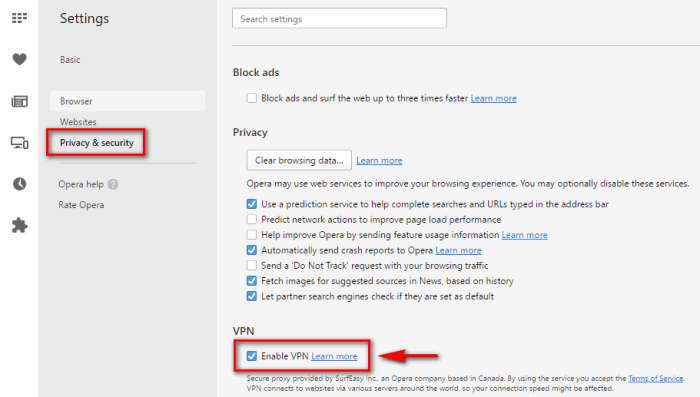
By understanding the nuances of VPN protocols, server locations, and security implications, you can effectively navigate the complexities of accessing geo-restricted content. This guide provides a comprehensive framework for configuring your VPN to unlock a wider range of online experiences while prioritizing your digital security. Remember to always choose a trusted VPN provider and stay updated on the latest security best practices to maintain a safe and secure online environment.
Mastering your VPN settings is key to a more connected and unrestricted online experience.