Your Facebook cover photo is more than just a picture; it’s a visual representation of your brand, personality, or message. A well-crafted cover photo can instantly communicate your values, attract attention, and leave a lasting impression on visitors to your profile. This guide will walk you through the process of selecting the right image, crafting a powerful message, and optimizing your design for maximum impact, transforming your Facebook presence into a compelling statement.
We’ll explore the technical aspects, such as ideal dimensions and file formats, along with the creative considerations of choosing the right style, incorporating text effectively, and understanding color psychology. By the end, you’ll have the knowledge and tools to create a Facebook cover photo that truly reflects who you are or what you represent.
Choosing the Right Image

Your Facebook cover photo is prime real estate for making a statement. It’s the first visual impression many people will have of your personal brand, whether that’s your professional work, a creative project, or simply your personality. Choosing the right image is crucial for conveying the desired message and attracting the right audience. A well-chosen cover photo can significantly enhance your profile’s appeal and effectiveness.
Selecting the perfect image involves considering several factors, from its visual style and message to its technical specifications. A poorly chosen or technically flawed image can detract from your profile, while a well-executed one can leave a lasting positive impression.
Optimal Image Dimensions and File Formats
Facebook recommends specific dimensions for cover photos to ensure they display correctly across all devices. Using the correct size prevents cropping or distortion, leading to a more professional and polished look. The recommended dimensions are 820 pixels wide by 312 pixels tall. While Facebook will allow you to upload images of other sizes, they will be resized and potentially cropped to fit this aspect ratio.
It’s best to create your image at the recommended dimensions from the outset. High-quality JPEGs (.jpg) are generally preferred for their balance of image quality and file size. PNGs (.png) are also acceptable, particularly if your image contains transparent elements or sharp lines that need to be preserved. Avoid using low-resolution images, as these will appear blurry and unprofessional.
High-Resolution Images for a Professional Look
High-resolution images are paramount for creating a professional and impactful Facebook cover photo. A blurry or pixelated image will immediately undermine your credibility and make your profile look less appealing. High-resolution images ensure sharp details are visible even when viewed on larger screens or when downloaded. This is especially important for images with text or intricate designs. The difference between a high-resolution image and a low-resolution image is immediately apparent: a high-resolution image is crisp and clear, while a low-resolution image is blurry and pixelated.
Using a high-resolution image demonstrates attention to detail and professionalism, which is vital for building a strong personal brand.
Image Styles for Making a Statement
Various image styles can effectively convey different messages and aesthetics. Photography offers a realistic and relatable approach, allowing you to showcase your personality or work through evocative imagery. Illustrations provide a more stylized and artistic feel, enabling creative expression and unique branding. Graphic design allows for precise control over visuals, enabling the creation of visually striking and information-rich cover photos.
The choice depends on your personal brand and the message you wish to convey. For example, a photographer might use a high-quality landscape photograph, a graphic designer might use a bold, minimalist design, and an author might use a captivating illustration related to their book.
Examples of Cover Photos
The following table provides examples of different cover photo styles and the moods they evoke:
| Image Style | Description | Mood/Aesthetic | Example Description |
|---|---|---|---|
| Photography | A well-lit, sharp photograph of a person working on a laptop in a vibrant, modern office. | Professional, modern, energetic | The image conveys a sense of productivity and success, ideal for a professional profile. |
| Illustration | A stylized illustration of a vibrant cityscape at night, with a single, prominent building highlighted. | Artistic, futuristic, ambitious | This image is visually striking and creates a sense of aspiration, perfect for a creative profile. |
| Graphic Design | A minimalist design featuring a bold geometric pattern in a sophisticated color palette. | Clean, modern, sophisticated | The image communicates a sense of elegance and order, ideal for a business or personal brand focused on precision. |
| Photography | A close-up shot of hands holding a paintbrush, with a partially finished painting in the background. | Creative, passionate, intimate | This image creates a sense of artistic process and personal connection, suitable for an artist’s profile. |
Crafting a Powerful Message
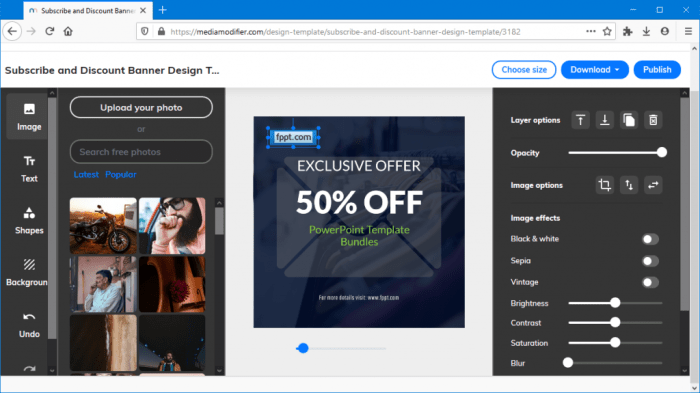
Your Facebook cover photo is more than just a pretty picture; it’s a visual representation of your brand or personal identity. A well-crafted message, seamlessly integrated into the image, can significantly enhance its impact, making it memorable and engaging for your audience. This involves a careful consideration of visual elements and the message itself, ensuring they work harmoniously to achieve your desired effect.Effective communication through a Facebook cover photo relies heavily on the strategic use of text.
Overly wordy cover photos can be overwhelming, while a lack of text might fail to convey your intended message. The key is finding a balance. The following sections will explore techniques to achieve this balance and create a visually appealing and impactful cover photo.
Text Integration Techniques
Integrating text effectively requires careful consideration of font, color, and placement. Avoid using too many different fonts, as this can create a cluttered and unprofessional look. Stick to one or two complementary fonts at most, ensuring readability even at smaller sizes. For example, a clean sans-serif font like Arial or Helvetica could be paired with a more decorative serif font like Times New Roman for emphasis, but only sparingly.
Colors should complement the background image and be easily readable against it. High contrast between text and background is essential. Consider using a text box with a subtle background color or a semi-transparent overlay to improve readability, especially on busy images. Proper spacing between words and lines ensures that the text is not cramped, improving readability.
Experiment with different arrangements and sizes until you achieve a balanced and aesthetically pleasing result.
Font, Color, and Spacing for Readability
The choice of font, color, and spacing directly influences the visual hierarchy and readability of your message. A visually striking font can draw attention, but it shouldn’t come at the expense of readability. For example, a bold, sans-serif font might be ideal for a headline, while a smaller, more subtle font could be used for supporting text. Color psychology plays a significant role.
Bright, vibrant colors can evoke excitement, while muted tones might convey a sense of calm. Consider the overall mood and message you want to convey when selecting your colors. Sufficient spacing between words, lines, and elements prevents visual clutter and improves readability. Ensure your text is not too crowded or compressed.
Impactful Phrases and Slogans
Choosing the right words is crucial. Here are five impactful phrases or slogans that can be adapted to suit various contexts:
- “Embrace the Journey” (Suitable for travel, personal growth, etc.)
- “Innovate. Inspire. Ignite.” (Suitable for business, creativity, etc.)
- “Find Your Strength” (Suitable for fitness, self-improvement, etc.)
- “Making a Difference” (Suitable for charity, social causes, etc.)
- “Your Vision. Our Expertise.” (Suitable for business, professional services, etc.)
Remember to select a phrase that resonates with your personal brand or the message you aim to convey.
Aligning Message with Personal Values
Your Facebook cover photo should reflect your personal values and goals. If you value creativity, your cover photo might feature a vibrant, artistic image with a message that reflects this. If you value community, the photo might show people interacting positively, with a message emphasizing connection and collaboration. Authenticity is key; don’t try to project an image that doesn’t align with your true self.
Consistency between your cover photo and other aspects of your online presence strengthens your brand identity and builds trust with your audience.
Designing for Specific Emotions
Evoking a specific emotion is a powerful tool. For example, to convey calmness, use a serene landscape image with pastel colors and a peaceful message like “Find Your Peace.” To evoke excitement, use a dynamic image with bright colors and a bold message like “Adventure Awaits.” To convey a sense of professionalism, use a clean, minimalist design with a concise message.
The image and text should work together to create the desired emotional response in the viewer. Consider using imagery and color palettes associated with specific emotions to enhance the overall impact.
Optimizing for Impact
A compelling Facebook cover photo isn’t just about the image; it’s about how effectively that image communicates your message. Optimizing for impact involves careful consideration of color psychology, visual cues, and technical aspects to ensure your photo grabs attention and leaves a lasting impression. This section will guide you through the process of refining your cover photo for maximum impact.
Color Psychology in Facebook Cover Photos
Color significantly influences mood and perception. Understanding color psychology allows you to choose colors that align with your brand and the message you want to convey. For example, blues often evoke feelings of trust and calmness, while reds can signify energy and excitement. Using a color wheel can help you understand complementary and contrasting colors, which can be used to create visually appealing and impactful combinations.
Consider your target audience and the overall feeling you want to create when selecting your color palette. A vibrant, energetic color scheme might be suitable for a fitness brand, whereas a calmer, more sophisticated palette might be better for a financial services company.
Using Visual Cues to Direct Attention
Visual cues, such as arrows, lines, and strategically placed text, can guide the viewer’s eye to the most important elements of your cover photo. A subtle arrow pointing towards a specific product or call to action can dramatically increase engagement. Similarly, using lines to create visual pathways can help direct the viewer’s gaze and create a sense of order and focus.
Think of it like designing a mini-billboard for your brand. You want to ensure the viewer sees the key information first.
Facebook Cover Photo Review Checklist
Before publishing your cover photo, a thorough review is crucial. This checklist will help ensure your photo is optimized for impact:
- Resolution: Is the image high-resolution and sharp, avoiding pixelation or blurriness?
- Aspect Ratio: Does the image fit Facebook’s recommended dimensions to avoid cropping issues?
- Contrast: Is there sufficient contrast between the image elements and the background? Can all text be easily read?
- Color Harmony: Are the colors visually appealing and consistent with your brand?
- Clarity of Message: Is your message clear, concise, and easy to understand at a glance?
- Visual Cues: Are visual cues effectively guiding the viewer’s attention to key elements?
- Overall Impression: Does the cover photo accurately represent your brand and effectively communicate your message?
Potential Issues Diminishing Impact
Several factors can negatively affect the impact of your Facebook cover photo. Low resolution images appear blurry and unprofessional, instantly diminishing credibility. Poor contrast makes it difficult to read text or discern important details. Incorrect aspect ratios lead to unwanted cropping, distorting your carefully chosen image. Finally, an unclear or confusing message will leave viewers unengaged and uninspired.
Updating Your Facebook Cover Photo: A Step-by-Step Guide
Updating your Facebook cover photo is a straightforward process. Here’s a step-by-step guide:
- Log in to Facebook: Access your Facebook account using your login credentials. (Imagine a screenshot of the Facebook login page here. The Facebook logo is prominent, with fields for email/phone and password.)
- Navigate to your Profile: Click on your profile picture in the top right corner of the page. (Imagine a screenshot of the Facebook profile page, highlighting the profile picture.)
- Locate the Cover Photo: Your current cover photo will be displayed at the top of your profile page. (Imagine a screenshot showing the current cover photo area.)
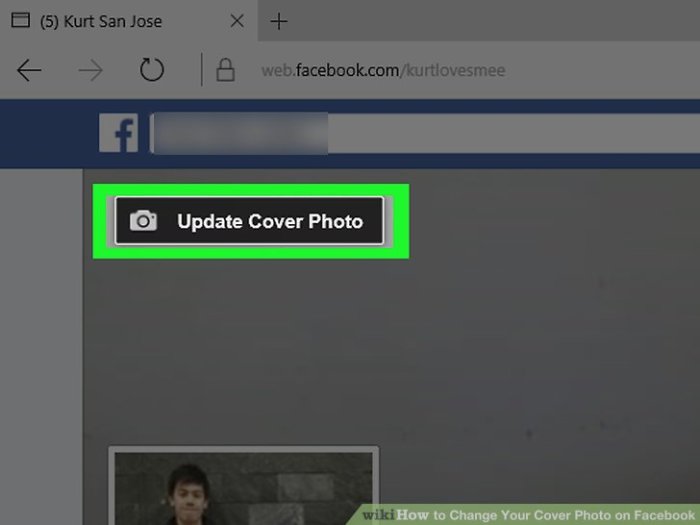
- Click “Update Cover Photo”: Look for the option to update your cover photo; it might be a button or a prompt. (Imagine a screenshot showing the “Update Cover Photo” button highlighted.)
- Choose your Image: Select the optimized image you’ve prepared from your computer’s files. (Imagine a screenshot showing the file selection window on a computer.)
- Adjust and Save: Drag and reposition the image to ensure optimal placement. Click “Save” or the equivalent to confirm the changes. (Imagine a screenshot showing the image placement options and a “Save” button.)
Final Review

Creating a striking Facebook cover photo is a powerful way to enhance your online presence. By carefully selecting your image, crafting a compelling message, and optimizing for visual impact, you can transform your profile into a dynamic and engaging representation of your brand or personal identity. Remember, a well-designed cover photo isn’t just about aesthetics; it’s about communicating effectively and making a memorable statement.
So, go ahead and unleash your creativity to craft a cover photo that truly shines!