Navigating the digital world today means confronting a constant barrage of targeted advertising. These ads, while seemingly convenient, rely heavily on tracking your online behavior. Understanding how ad personalization works and taking control of your settings is crucial for protecting your privacy. This guide empowers you to regain control over your data by showing you how to adjust your ad personalization settings across various platforms and employ additional privacy-enhancing techniques.
We’ll explore the mechanisms behind personalized ads, the types of data collected, and the implications for your privacy. Then, we’ll provide clear, step-by-step instructions for modifying your settings on popular platforms like Google and Facebook. Finally, we’ll delve into advanced strategies, such as using browser extensions and privacy-focused browsers, to further minimize online tracking.
Understanding Ad Personalization and Tracking
Ad personalization is a common practice employed by many online platforms to tailor advertising content to individual users. This process leverages vast amounts of user data to increase the likelihood of ad engagement and, consequently, improve the return on investment for advertisers. Understanding how this works, and the data involved, is crucial for making informed decisions about your privacy settings.Ad personalization relies on collecting and analyzing user data to create detailed profiles.
These profiles inform the selection of ads displayed to each user, making the advertising more relevant and potentially more effective. This seemingly innocuous process, however, raises significant privacy concerns.
Data Collection for Ad Personalization
Various types of data contribute to the creation of these user profiles. The most commonly used data categories include browsing history, location data, demographic information, and device identifiers. Browsing history reveals user interests and preferences based on the websites and content they engage with. Location data, often obtained through IP addresses or GPS, helps target ads geographically. Demographic data, such as age, gender, and income, further refines ad targeting.
Finally, device identifiers, such as cookies and unique device IDs, allow platforms to track user activity across different sessions and devices. The combination of these data points creates a rich picture of each user, allowing for highly targeted advertising.
Privacy Implications of Ad Personalization Methods
The privacy implications of ad personalization vary depending on the methods used and the level of data collected. For example, the use of cookies, while enabling personalized ads, also raises concerns about tracking user activity across multiple websites without explicit consent. Similarly, the collection of precise location data raises privacy concerns about the potential for surveillance and profiling.
Conversely, using anonymized or aggregated data minimizes the risk of identifying individual users, though it also reduces the effectiveness of personalization. A balance must be struck between providing relevant advertising and respecting user privacy.
Benefits and Drawbacks of Personalized Advertising
The use of personalized advertising presents both advantages and disadvantages. While it offers benefits to both advertisers and consumers, it also raises significant privacy concerns.
| Benefits | Drawbacks | Data Used | Platform Example |
|---|---|---|---|
| More relevant ads, leading to increased engagement | Privacy concerns related to data collection and tracking | Browsing history, location | Google Ads |
| Improved return on investment for advertisers | Potential for discriminatory or biased advertising | Demographics, online behavior | Facebook Ads |
| Discovery of new products and services tailored to individual needs | Possibility of manipulative advertising techniques | Device identifiers, purchase history | Amazon Ads |
| Cost-effectiveness for advertisers due to increased targeting accuracy | Lack of transparency regarding data usage and sharing | App usage data, social media interactions | Instagram Ads |
Locating and Modifying Ad Personalization Settings Across Platforms

Managing your online advertising personalization settings is crucial for controlling the data used to target you with ads. Different platforms offer varying levels of control, and understanding these settings allows you to tailor your online experience to your privacy preferences. This section provides step-by-step instructions for adjusting these settings on popular platforms.
Google Ad Personalization Settings
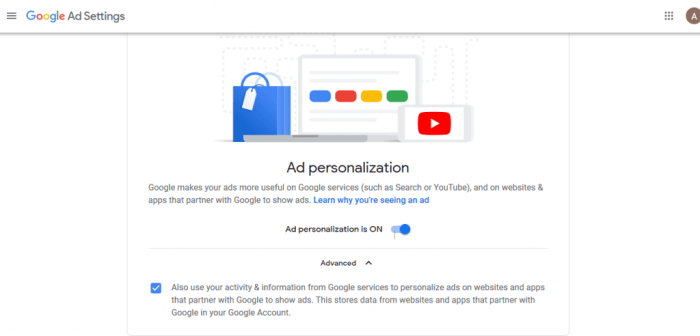
To manage your Google ad personalization settings, navigate to your Google Ads settings. This typically involves logging into your Google account and accessing your account settings. Once there, look for a section dedicated to “Ads Personalization” or a similar label. Within this section, you will find options to control the level of personalization in your Google ads.
You can typically choose to turn off personalized ads entirely, which will result in seeing more generic ads based on your general location and browsing activity rather than your specific interests and search history. You might also find options to manage the categories of ads you see, potentially allowing you to opt-out of certain types of advertising. The specific wording and location of these settings may vary slightly depending on your device and Google account configuration.
Facebook/Meta Ad Personalization Settings
Managing ad personalization on Facebook/Meta is similar. Begin by logging into your Facebook or Meta account. Then, access your settings, usually found through a dropdown menu associated with your profile picture. Look for a section labeled “Settings & Privacy,” followed by “Settings.” Within the settings menu, search for “Ads” or “Ad Preferences.” This section allows you to control ad personalization.
Here, you’ll find options to manage your ad interests, which are used to target ads based on your past activity and preferences. You can review and remove interests you no longer wish to be associated with. You can also choose to limit ad personalization based on your activity both on and off Facebook/Meta. Again, the exact location and wording may vary slightly with updates to the platform’s interface.
Comparative Guide to Ad Personalization Settings Across Platforms
| Platform | Settings Location | Key Options | Impact of Disabling |
|---|---|---|---|
| Google Ads Settings | Turn off personalized ads, manage ad categories | Generic ads based on general location and browsing activity; less targeted ads. | |
| Facebook/Meta | Settings & Privacy > Settings > Ads | Manage ad interests, limit ad personalization based on on and off-platform activity | Generic ads; reduced targeting based on interests and behaviors. |
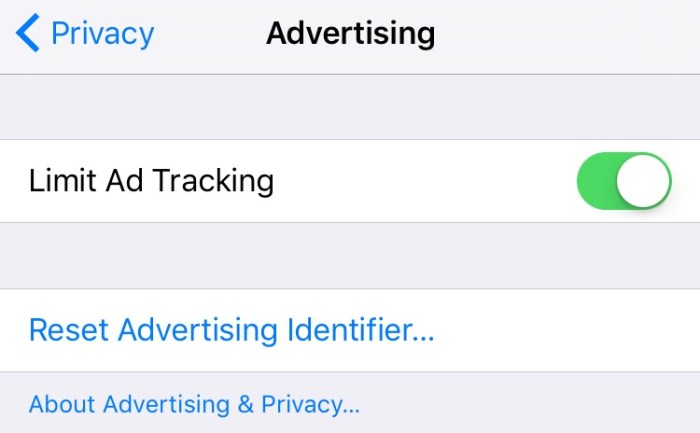
| Apple | Settings > Privacy & Security > Tracking | Limit ad tracking, control personalized ads in apps | Reduced targeted advertising within apps; ads may be less relevant. |
The table above provides a high-level comparison. Remember that specific options and their locations can change with updates to the platforms. Always consult the platform’s help documentation for the most up-to-date instructions.
Implications of Disabling Ad Personalization
Disabling ad personalization across various platforms typically results in seeing fewer targeted ads. You’ll likely encounter more generic ads that are less relevant to your interests. This can affect the user experience in several ways. For example, you might see more irrelevant ads, potentially leading to ad fatigue. However, it also contributes to increased privacy by limiting the data collected about your online behavior.
The trade-off is between more relevant advertising and a greater level of privacy. The exact impact will vary depending on the platform and the extent to which you disable personalization. For instance, disabling ad personalization on Google might reduce the number of targeted ads related to your recent searches, while disabling it on Facebook might limit the ads tailored to your social media activity and interactions.
Advanced Techniques and Considerations for Limiting Tracking
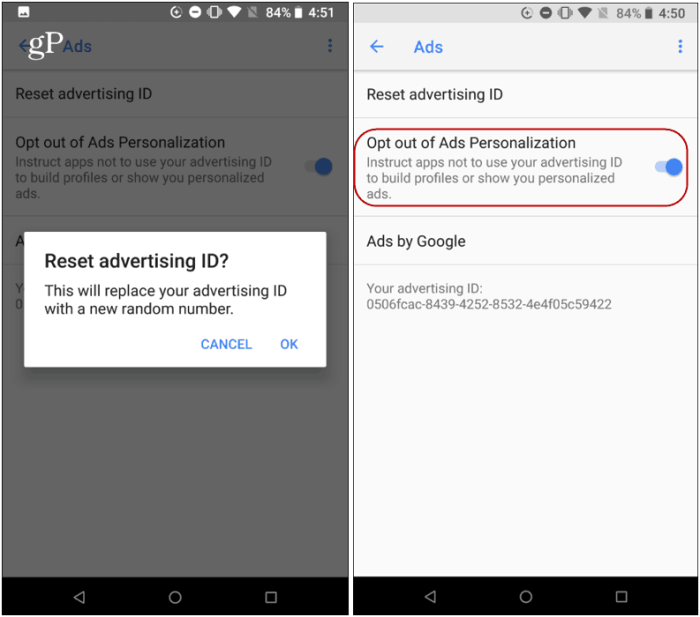
Beyond adjusting individual platform settings, several advanced strategies significantly reduce online tracking. These methods offer a more comprehensive approach to protecting your privacy, going beyond simply limiting ad personalization. Understanding and implementing these techniques can provide a stronger defense against unwanted surveillance.
Browser Extensions for Enhanced Privacy
Numerous browser extensions enhance privacy by blocking trackers, managing cookies, and improving overall online security. These extensions offer a user-friendly way to implement more robust privacy controls than those built into browsers. Popular choices include uBlock Origin (a powerful ad and tracker blocker), Privacy Badger (which learns to block trackers over time), and HTTPS Everywhere (which enforces secure connections whenever possible).
These extensions work by identifying and blocking known trackers and malicious scripts embedded in websites, preventing them from collecting your browsing data. The effectiveness of these extensions varies depending on the specific extension and the sophistication of the tracking techniques employed. For example, some advanced trackers may employ techniques to evade detection by these extensions, highlighting the need for a multi-layered approach to privacy.
Comparison of Privacy-Focused Browsers
Several browsers are specifically designed with enhanced privacy features. These browsers often incorporate built-in ad and tracker blockers, enhanced privacy settings, and other features designed to minimize data collection. A comparison of three popular options reveals key differences: Brave browser emphasizes a built-in ad blocker and a focus on user privacy; Firefox, while not exclusively privacy-focused, offers strong customization options and extensions to enhance privacy; Tor Browser prioritizes anonymity and is designed to mask your IP address and browsing activity, making it ideal for situations requiring a high level of privacy.
The choice of browser depends on your specific privacy needs and technical expertise; Brave is user-friendly, Firefox offers flexibility, and Tor provides maximum anonymity at the cost of some usability.
Best Practices for Minimizing Online Tracking
Minimizing online tracking requires a holistic approach extending beyond browser settings. A combination of strategies is essential for effective protection.
- Use strong, unique passwords for all online accounts.
- Enable two-factor authentication whenever possible.
- Regularly review and delete your browsing history and cookies.
- Be cautious about clicking on links from unknown sources.
- Avoid using public Wi-Fi for sensitive activities.
- Use a password manager to securely store and manage your passwords.
- Keep your software updated to patch security vulnerabilities.
These practices, when combined, create a more secure online environment, reducing the risk of data breaches and unwanted tracking.
Utilizing VPNs for Enhanced Privacy
Virtual Private Networks (VPNs) encrypt your internet traffic and mask your IP address, making it more difficult for websites and advertisers to track your online activity. VPNs route your internet traffic through a secure server, hiding your real location and preventing trackers from associating your browsing activity with your identity. Choosing a reputable VPN provider is crucial, as some VPNs may log your activity or have inadequate security measures.
Using a VPN in conjunction with other privacy tools like browser extensions and privacy-focused browsers creates a layered defense against online tracking. For example, a user accessing a website known for aggressive tracking would find their IP address masked by the VPN, making it much harder to associate their browsing activity with their real location and identity.
Conclusive Thoughts
Taking control of your ad personalization settings is a significant step towards protecting your online privacy. By understanding how these settings work and actively managing them across different platforms, you can significantly reduce the amount of data collected about your online activities. Remember that utilizing additional privacy tools and best practices further enhances your online security and safeguards your digital footprint.
Taking proactive steps now will contribute to a more private and secure online experience in the long run.